Socrative, the online platform for educators, does not have any built-in proctoring tools, but provides ways to prevent cheating. The new AI features available on the platform help teachers generate quizzes based on student performance and also keep track of student activities.
Since many students wonder can Socrative detect cheating and whether there are any ways to cheat, we have talked all about the platform in the blog.
Let’s start learning!
Key Takeaways
- Socrative can’t directly detect cheating, but it helps prevent and flag it indirectly.
- Features like question randomization, timers, and single attempts reduce cheating chances.
- Teachers use live monitoring and reports to spot unusual patterns.
- No lockdown browser, camera, audio, or search history tracking is used.
- Effectiveness depends on how instructors use Socrative’s settings.
What Is Socrative?
Socrative is a web-based and mobile-friendly online tool that allows educators to produce and administer quizzes and polls to students. It can be used for formative or summative assessments, engage students, and create reports to evaluate student performance. It can be used for both remote and on-campus sessions.
Students can hire take my online class experts if they face challenges navigating the platform.
The Key Features of Socrative
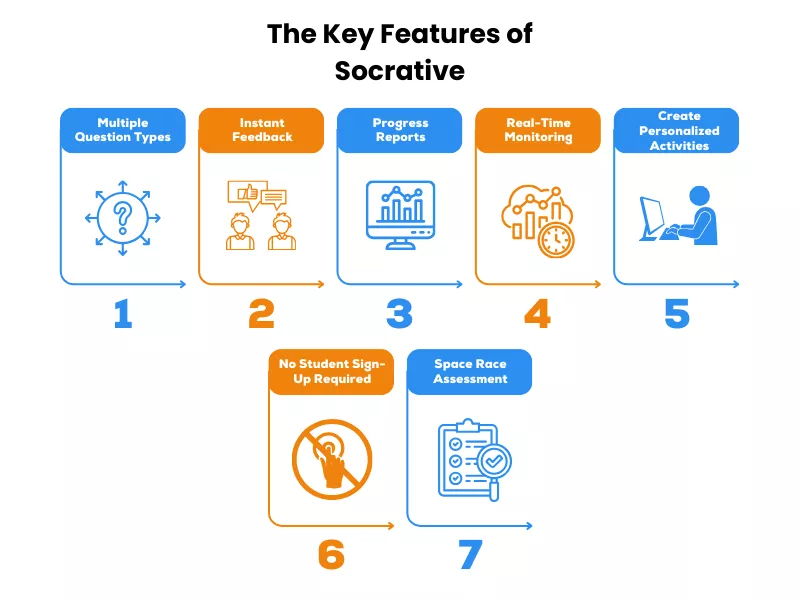
Socrative is a multifunctional online tool developed with the purpose of giving instructors the opportunity to conduct real-time assessments for learning improvement. Some of the features of Socrative include the following:
Multiple Question Types
Socrative provides teachers with the facility to set up many types of questions, which range from multiple-choice and true/false to short-answer type, making it difficult to cheat.
Instant Feedback
Among the main attractive features of Socrative is that both teachers and students have instant feedback.
Progress Reports
Socrative provides detailed reports of student performance over time. Reports can be exported in many formats.
Real-Time Monitoring
Teachers can monitor each student’s responses in real time, which is particularly useful for identifying learning gaps during online classes, which you can still avoid if you learn how to cheat on Respondus LockDown Browser.
Create Personalized Activities
Instructors may create customized quizzes and activities that match their specific classroom needs.
No Student Sign-Up Required
Socrative makes it easy on the students: no sign-ups are required.
Space Race Assessment
The Space Race feature adds a competitive element to assessments, allowing students to work in teams to answer questions quickly.
What’s New on Socrative?
The platform has included a lot of features and is focused heavily on integrating AI to reduce teacher workload, improve reporting capabilities, and team collaboration. Here are the new features that you must be aware of :
A. Generate Questions from Insights
Teachers have the option of selecting specific ‘areas of improvement’ from quiz results to generate targeted follow-up questions to reinforce learning.
B. AI-Powered Personalized Practice
Users can create custom practice assignments for specific students based on where they struggled most.
C. Generate Quiz from Prompt
Teachers can type in prompts to create entire quizzes. They can also paste a URL for generating quizzes.
While these can help teachers with a lot of things, you might be waiting to know if there’s any new feature that can help the platform detect cheating. Although the platform cannot directly detect cheating, it does have several features that can help prevent it.
Does Socrative Have Anti-Cheat Features?
Although there are no Socrative anti-cheating features, it does have a number of features that go toward the prevention of academic cheating. These features are discussed in the following:
- Socrative allows teachers to randomly assign questions to every student, which makes it more difficult for students to share answers.
- Teachers can also set a timer on the quizzes to limit the amount of time students will have to look up answers or collaborate. Like you cannot cheat on APEX Learning as the platform has proctoring systems, Socrative gives options to prevent cheating from happening.
- Students can view questions one at a time. It eliminates their ability to scroll through the entire quiz to find answers, as they may have communicated in advance.
Socrative tracks students with a detailed reporting system that offers insights to help teachers identify unusual patterns or results that may indicate dishonest behavior.
How Does Socrative Detect Cheating?
Socrative can detect cheating in various methods and ensure students complete their tasks independently. In addition, features in Socrative make it difficult for students to cheat, including:
- Randomizing questions: Socrative shuffles questions and answers to prevent cheating.
- Require names: This feature holds the students responsible for the activity that has been done.
- One attempt: Students only get one attempt at a question, and they continue where they left off if they log out and login again.
With the analytics feature, Socrative allows teachers to review student’s responses and identify suspicious activities. This feature is common across various platforms and is used to prevent cheating on Apex Learning as well.
How Socrative Detects Cheating? The New Features
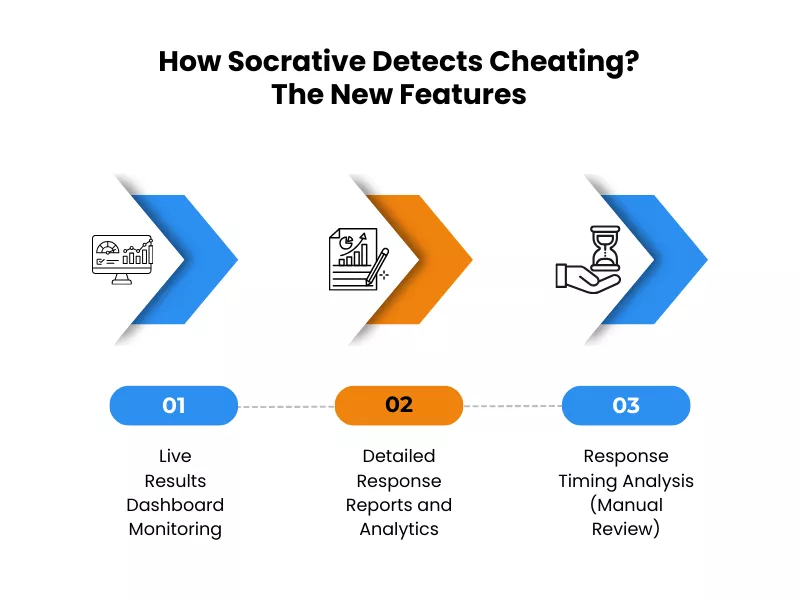
In addition to the different existing features, here are the new features that you must be aware of:
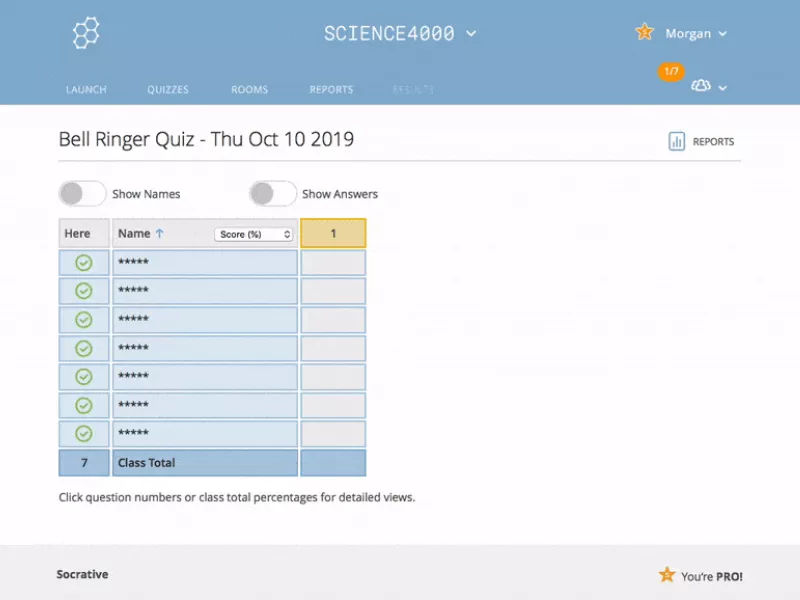
A. Live Results Dashboard Monitoring
Teachers can see student responses during active quizzes in real time through the platform’s Live Results feature. Here’s what they can see:
➜ Color-coded responses – Green for correct answers, and red for incorrect answers
➜ Progress indicators – This is a grid that fills up as each student completes questions
➜ Connection status – It shows the students who are logged in and active
➜ Completion percentage – Shows how far the students progressed in each quiz
How does it help understand or detect cheating?
➜ Multiple students submitting answers at the exact same moment
➜ Students finishing entire quizzes in too short timeframes
➜ Identical wrong answer pattern appearing simultaneously
B. Detailed Response Reports and Analytics
Once the quizzes are completed, the platform generates comprehensive reports for teachers to download and analyze. The reports will include:
➜ Student-level data
◆ Individual scores and performance breakdowns
◆ Answer choices for each question
◆ Quiz completion timestamp
◆ Question-by-question response history
➜ Class-level data
◆ Average class performance
◆ Most commonly missed questions
◆ Distribution of answer choices
◆ Performance trends over time
How do teachers use this to detect cheating?
The teachers analyze the reports and look for:
➜ Identical answer patterns
➜ Inconsistent performance
This gives an idea about if a student has cheated to find the answers or not.
C. Response Timing Analysis (Manual Review)
Teachers can analyze timing manually by:
➜ Reviewing completion times – If a student completes a 20-minute quiz in 5 minutes, or students who take time to complete the tasks suddenly finish fast, are considered suspicious.
What do teachers look for?
Teachers look for these things while analyzing:
➜ Too fast answers
➜ Too slow to answer the questions
➜ Multiple students submitting answers at the same time
All these can help prevent cheating. However, the main point remains the same: Socrative alone cannot detect cheating without the use of any third-party software. The platform’s cheating detection is similar to how Moodle detects cheating.
How Effective Are Socrative Features in Preventing Cheating?
The success of the tool to deter cheating is based on how instructors leverage Socrative. Some of the best practices that can be leveraged in Socrative, in a bid to build assessment integrity, include: question pools designed by instructors and unique to every assessment, Socrative randomization of questions, timers for questions, and monitoring of student activities.
It is important to note that while Socrative’s features make it challenging for students to cheat, some students may still find ways to cheat. Continue reading to know some of the ways.
How To Cheat On Socrative?
So, can you cheat on Socrative? Let’s take you through a few ways you might feel useful:
Use Text Messages
Text messaging among classmates during a quiz allows students to share the answers on Socrative. This real-time collaboration compromises the integrity of the exam. Though this may help to achieve better grades for the time being, if the instructor catches it, it can lead to severe consequences.
Use a Duplicate Account
Having a second account in Socrative would enable the student to look at the questions or attempt to answer them aside from submitting an answer using the primary account. Such is an effective method, yet teachers can easily trace this and might be constituted as academic dishonesty.
Use Another Device
Using a smartphone or tablet to look for Socrative test answers makes it easier to get access to further information or answers without even catching the teacher’s attention of the teacher. This can increase scores, but this also undermines learning and can have severe effects if found by school authorities.
A student can also try this method on the ALEKS test. While many learners feel pressured and end up searching online for ways to “cheat on ALEKS test,” the better approach is to use proven study methods and reliable academic support that actually strengthen understanding.
Shared Screen
This will be possible by joining up on the Socrative quizzes with your friend, expert, or group by screen sharing with them. This would mean that others may see your questions and answer or help you on the quiz. This means the instructors can watch some of the time or performance differences of their students, and in this case, one type of penalty may be incurred.
Recruit a Friend
Another way students might try to Socrative hack is by bringing a friend into the quiz to help them out. They can provide answers or try to solve problematic questions. But that, of course, does not promote independent learning, and if the teacher finds out about this collaboration, they may take disciplinary actions.
Can Teachers Tell If You Cheat On A Socrative Quiz?

Yes, teachers can detect cheating on Socrative quizzes using various features and techniques:
- Randomized answer options: In this, Socratic can randomize the order of the answer options for every student, which would make it very hard to copy from others.
- Multiple Attempts: Teachers can allow or restrict students to numerous attempts on a quiz, preventing them from getting answers from others.
- Automatic Reporting: Socrative analytics can automatically flag suspicious activity. This may include alerting the teachers regarding cheating on the test.
- Timers and Shuffling: Teachers also have options to put timers for each question and shuffle seats in order to make a secure testing environment.
However, Socrative doesn’t use the Respondus Lockdown Browser as it is an independent online assessment tool. To learn more about the Lockdown Browser, click on the link.
What Is An Exit Ticket On Socrative?

An exit ticket on Socrative is an application of formative assessment at the end of a class. It is intended to understand how much students have learned and also to get feedback about the class in general. It typically consists of three questions that provide different insights about the learning process of the students:
- Understanding of Material: Students assess how well they understood the day’s lesson, often through a multiple-choice format.
- Learning Reflection: They describe what they learned during the class in an open-response format.
- Teacher’s Question: Students respond to a specific question posed by the instructor, which can be presented verbally or written on the board.
This is an end-of-class quick evaluation that saves the teachers from the hassle of paper slips for invaluable feedback. Data is used to inform and make appropriate changes in lessons. It also helps with varied homework assignments for inclusive learning. It clears up misconceptions before the next lesson.
Conclusion
Frequently Asked Questions
Can teachers tell if you are using ChatGPT?
No, Socrative cannot directly tell if you are using ChatGPT or any AI tools. However, teachers can tell if a student has used AI for their answers by looking for:
- Socrative response patterns
- External tools
Can teachers see how long you spend on a question in Socrative?
Yes, teachers can see how long you spend on a question in Socrative. While you cannot see a timer on your screen, the time to completion for each response is recorded on the Socrative teacher dashboard.
Can teachers track student progress on Socrative?
Yes, they can in real time. One of the main features of the platform is the ‘Live Results’ tab. From the teacher’s screen, they can see a grid that fills up as students work. The features include:
- Green/red blocks
- Progress percentage
- Connection status
Can teachers see if you cheat on Socrative test?
This is not possible directly, but indirectly, teachers can see if you cheat on a test. Since Socrative is not a Lockdown Browser, it cannot stop you from teaching. However, teachers could detect cheating through:
- Scorative IP tracking
- Browser behavior
- Shuffled questions
Can Socrative see your search history?
No, it cannot. Socrative is a web-based application and does not have permission to access your browser’s history, saved passwords, or other tabs. It can only see what you did on the platform.
Does Socrative record audio or video?
No, the platform does not request access to your microphone or camera. The tool is completely text and image-based. Unless your teacher is using a separate video conferencing tool simultaneously, you are not being recorded.
Related Blogs

Cheat On Apex Learning: Tips and Tricks to Pass Your Classes

Know The Excellent Tricks On How To Cheat On MyMathLab?

How to Cheat on WeBWork: Mastering WeBWork with Academic Integrity

Want To See My Profile — Check Now
- Can Socrative Detect Cheating? A Complete Guide for Students - January 27, 2026
- How to Stay Organized in Online Classes: 5 Proven Strategies for Success - November 13, 2025
- Micro-Credentials and Online Class Help: The Future of Education - October 23, 2025

![How Connect Integrates with Canvas or Blackboard LMSs [LTI Integration]](https://www.gotakemyonlineclass.com/wp-content/uploads/2026/03/How-Connect-Integrates-with-Canvas-or-Blackboard-LMSs-LTI-Integration-1.webp)